|
|
|
|
|
Description of the Stereoscopic .PNG Image File Format (sTER chunk) | |
|
|
|
|
|
|
|
|
||||||||||||||||||||||||||||||||||||||||||||
|
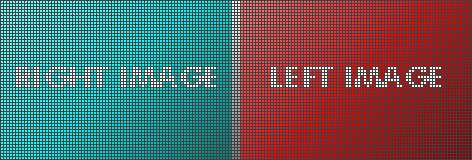
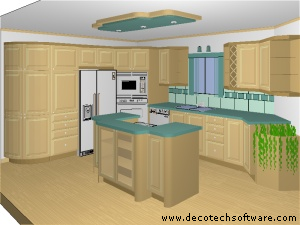
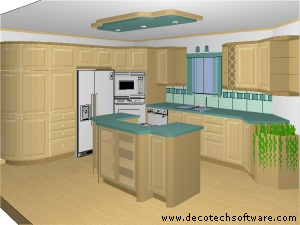
NOTE: To clearly understand the topics covered on this page, you must have a good knowledge of the .PNG file format. You can find all the information about .PNG file format on the official Website (www.libpng.org). Having some knowledge about how a stereoscopic image works is also a good start. When present, the sTER chunk indicates that the datastream contains a stereo pair of subimages within a single PNG image. The data portion of the sTER chunk consists of an unsigned 8 bits integer that contains the storage mode. The two supported storage modes are CROSS_FUSE_LAYOUT = 0 and DIVERGING_FUSE_LAYOUT = 1. The sTER chunk with mode==0 or mode==1 indicates that the datastream contains two subimages, encoded within a single PNG image. They are arranged side-by-side, with one subimage intended for presentation to the right eye and the other subimage intended for presentation to the left eye. The left edge of the right subimage must be on a column that is evenly divisible by eight, so that if interlacing is employed the two images will have coordinated interlacing. Padding columns between the two subimages must be introduced by the encoder if necessary. The sTER chunk imposes no requirements on the contents of the padding pixels. For compatibility with software not supporting sTER, it does not exempt the padding pixels from existing requirements; for example, in palette images, the padding pixels must be valid palette indices. The two subimages must have the same dimensions after removal of any padding. When mode==0, the right-eye image appears at the left and the left-eye image appears at the right, suitable for cross-eyed free viewing. When mode==1, the left-eye image appears at the left and the right-eye image appears at the right, suitable for divergent (wall-eyed) free viewing. Decoders that are aware of the sTER chunk may display the two images in any suitable manner, with or without the padding. Decoders that are not aware of the sTER chunk, and those that recognize the chunk but choose not to treat stereo pairs differently from regular PNG images, will naturally display them side-by-side in a manner suitable for free viewing. If present, the sTER chunk must appear before the first IDAT chunk. Given two subimages with width subimage_width, encoders can calculate the inter-subimage padding and total width W using the following pseudocode:
padding := 7 - ((subimage_width - 1) mod 8) Given an image with width W, decoders can calculate the subimage width and inter-subimage padding using the following pseudocode:
padding := 15 - ((W - 1) mod 16) Decoders can assume that the samples in the left and right subimages are cosited, such that the subimages and their centers are coincident at the projection plane. Decoders can also assume that the left and right subimages are intended to be presented directly to the right and left eyes of the user/viewer without independent scaling, rotation or displacement. I.e., the subimages will be presented at the same size in the same relative position and orientation to each eye of the viewer. Encoders should use the pHYs chunk to indicate the pixel's size ratio when it is not 1:1. It is recommended that encoders use the cross-fusing layout (mode==0), especially when the image centers are separated by more than 65 millimeters when displayed on a typical monitor. An example will help understanding the way a stereoscopic image of 77x53 pixels is saved like a normal image of 157x53 pixels. - Right and left images are 77x53 pixels.
IMPORTANT: Even if the padding pixels are never displayed, their values must always be valid because an application, not supporting the sTER chunk, will display the complete image with the padding pixels. (The only dangerous case is the color palette case with less entries in the palette than the bit depth can produces.) In the example above, we are using grayscale padding pixels only to make the padding region more obvious to see. The reason to put right image at left and left image at right is simply because the Cross-Eyed Display Technique is more flexible than the Parallel-Eyes Display Technique. The Parallel-Eyes Display Technique limits the distance (so the size of images) between right and left center of images on screen to be less than the distance between your eyes. By example, the Parallel-Eyes Display Technique used on a Web page can work well on a 17" monitor but not on a 19" monitor (unless you can move your eye globes in opposite direction without been injured!). The Cross-Eyed Display Technique does not have this limitation and works 100% of the time. Applications, those do not yet support the sTER chunk, will simply display an image composed of two subimages with sometimes some padding pixels between them. In such applications, you will still be able to view the stereoscopic image by using the Cross-Eyed Viewing technique if storage mode==0, or using the Parallel-Eyes Viewing technique if storage mode==1.
DECODER EXAMPLE : As you can see, adding support to Stereoscopic
.PNG Image File Format is a piece of cake if your application already
support .PNG Image File Format. |
|
||||||||||||||||||||||||||||||||||||||||||||
|
|
|
|
|
|
|
|
|
|
|
|
|
|
|