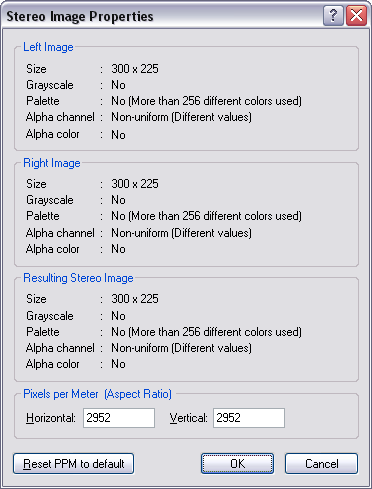
This dialog box gives some statistics about the current active stereoscopic image.
The Resulting Stereo Image section is about the stereoscopic
.PNG image composed
with the right image followed by the left image with sometimes some
padding pixels between them.
Size
Displays the size
of the image.
Grayscale
Displays No if the image contains at least one colored pixel.
Displays Yes if the image contains only grayscale pixels.
Palette
Display Not applicable if the image is grayscale.
Displays No if the image contains more than 256 different colors.
Displays Yes if the image contains 256 or less different colors.
Alpha channel
Displays Uniform if the alpha channel contains all the same alpha
value.
Displays Non-Uniform if the alpha channel contains different alpha
values.
Displays Non-uniform but Palette Alpha if the total of alpha palette
indexes is 256 or less. (Each color palette index is associated to
its corresponding alpha palette index. By example, if a color has
three different alpha values, the color palette will use three indexes for
this color to associate them to the three different alpha values.)
Alpha color
Displays No if the alpha channel can not be created with an unique
pixel color associated to the 0 alpha value.
Displays Yes if the alpha channel can be created with an unique
pixel color associated to the 0 alpha value.
Pixels per Meter (Aspect Ratio)
Use to indicate the physical size of the image and indirectly the aspect
ratio of the image. By example, if you are creating a new stereoscopic
image from an existing interlaced stereoscopic image, in which the left and right images contain only
the half
the total horizontal scan lines, you shall set the Horizontal and Vertical
pixels per meter values to create an aspect ratio of 2:1 (Hz:Vt) like
2952:1476. That will mean that the pixel width is twice the
dimension of the pixel height. By doing so, the stereoscopic image will
always be displayed correctly whatever the selected displaying mode will
be. (For
more information, read the Decoder Example.)
Note: To convert from pixels per meter to pixels per inch: pixels_per_inch = (2.54 * pixels_per_meter / 100).
Note: To convert from pixels per inch to pixels per meter:
pixels_per_meter = (100 * pixels_per_inch / 2.54).
Reset PPM to default
Reset both Horizontal and Vertical pixels per meter values
to 2952 pixels per meter (75 pixels per inch).
|


